
Texo
A modern LaTeX workspace for researchers, students and technical writers.
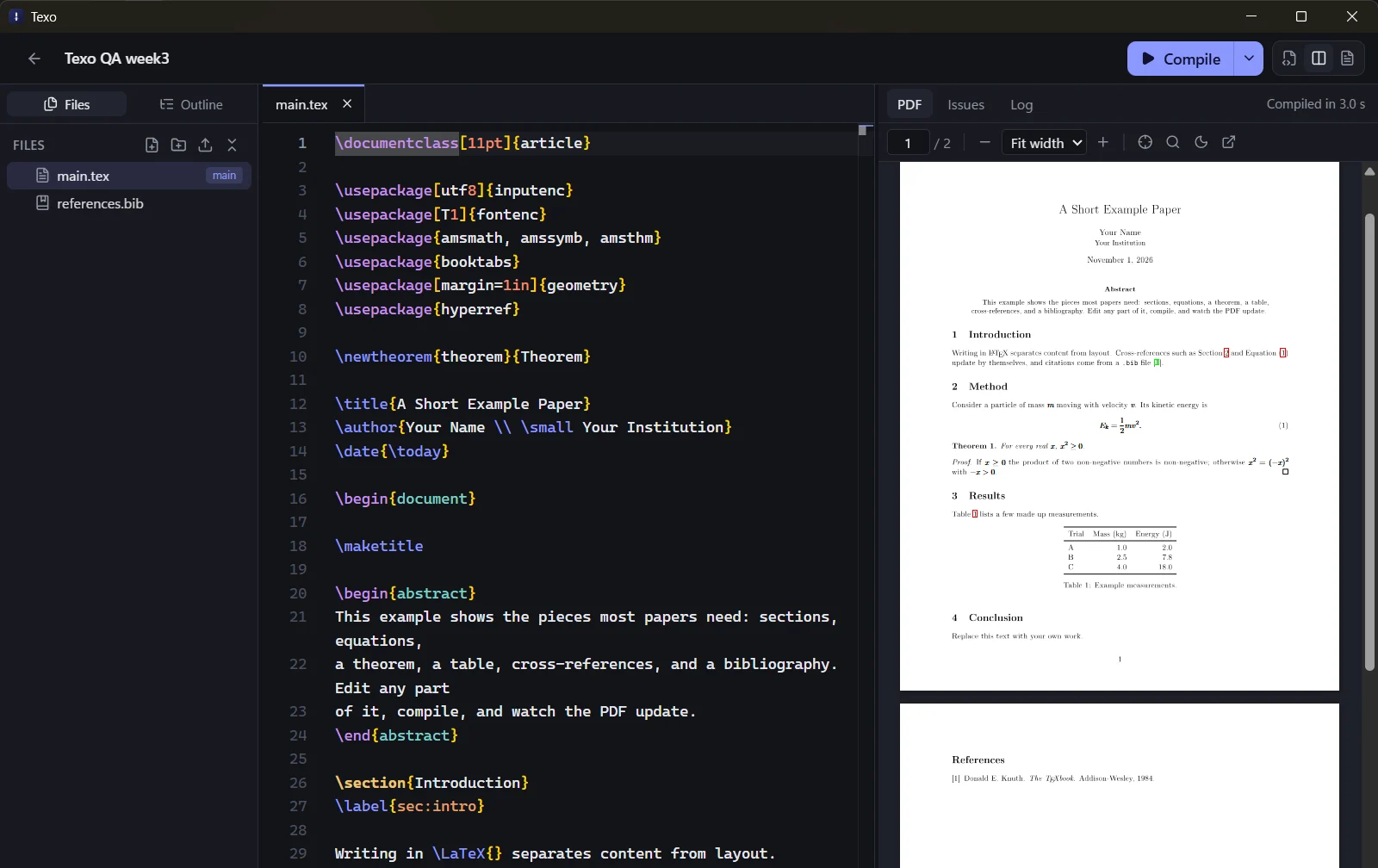
Texo is a desktop LaTeX editor. Your source sits on the left, the compiled PDF on the right, and saving updates it. The LaTeX engine comes with the app, so there is nothing else to install, and your projects stay as plain folders on your own disk.
- Status
- Version 1.0
- Platforms
- Windows, Linux (x86-64)
- Licence
- MIT
What Texo does.
Developed for researchers, students and technical writers.
Live PDF preview
Save, and the PDF updates beside the editor. The viewer keeps your place, and has zoom, find and a dark page mode.
Actionable compile errors
Errors, warnings and layout problems are read from the TeX, BibTeX and Biber logs. Each one links to the line that caused it.
Jump between source and PDF
With SyncTeX, double-click the PDF to go to the source line, or highlight the cursor's position in the PDF.
Code or Visual
Switch a file to Visual mode to write in a rendered view with headings, lists, maths and tables. It edits the same source and leaves the rest unchanged.
A built-in engine
Tectonic ships with the app. If you already have MiKTeX or TeX Live, Texo can use pdfLaTeX, XeLaTeX or LuaLaTeX from that instead.
Ten templates
Papers, a thesis, lecture notes, an assignment, Beamer slides, a letter and a CV. Each is a plain folder.
How it works.
Start a project
Pick a template, open an existing LaTeX folder, or import a .zip from another editor.
Write
Completions for commands, labels, citations from your .bib files and file paths, in Code or Visual mode.
Compile
Texo compiles after each save, or when you press Ctrl+Enter. Problems appear in the Issues panel and as squiggles in the editor.
Keep the PDF
After each successful compile the PDF is saved next to your main file, ready to send.
Files remain on your own disk.
- A project is an ordinary folder. It still opens in any other LaTeX editor.
- Texo requires no account and uploads nothing.
- After the first compile, which fetches the LaTeX packages a document needs, everything works offline.
- Downloaded projects cannot run their own build scripts until you choose to trust them.
Platforms and licence.
- Platforms
- Windows
- Linux (x86-64)
- Current version
- 1.0.0
- Requirements
- Windows: needs WebView2, which is part of Windows 11; the installer fetches it on older systems.
- Linux: AppImage or .deb, needs WebKitGTK 4.1.
- The installers are not yet code-signed, so Windows SmartScreen may display a warning before installation.
- Licence
- MITTexo is open source under the MIT licence.
Downloads and links.
- Download
Download Texo
github.com/codewithdark-git/Texo/releases/latest
- Open the repository
Repository
github.com/codewithdark-git/Texo
Frequently asked questions.
Is a separate LaTeX installation required?
No. A LaTeX engine (Tectonic) ships with Texo. On first launch it downloads a set of common LaTeX packages, about 90 MB, once.
Which systems does Texo run on?
Windows and 64-bit Linux. A macOS version is on the roadmap but is not available.
Can projects from another editor be opened?
Yes. Open any existing LaTeX folder, or import a .zip or .tar.gz. Texo keeps its own data in a hidden .texo folder and does not rewrite your sources.
Does it work offline?
Yes, after the first compile of a document, which fetches the packages that document needs.
Is Texo free?
Yes. It is free and open source under the MIT licence.
Why does Windows display a warning during installation?
The installers are not yet code-signed. Choose More info, then Run anyway.
Contributions towards Texo go to the studio's single fund, which supports the development of all of our products. Contribute to development.
Use the software. Share your feedback.
Texo and Vocelle are free to download. Bug reports and feedback determine what we build next.